Merge PDF and Compress: Combine Files and Reduce Size
Combine application documents in order, then reduce the merged PDF to a target size such as 2 MB. Follow the steps and check the result before uploading.
Use the receiving portal’s checklist to decide which documents belong in one upload. Put the application first and supporting evidence after it only if that matches the checklist. Keep the individual originals. Choose 2–40 ordinary PDFs, with a total input of up to 30 MB and 200 pages. Use the Move earlier and Move later controls to arrange files, and rotate pages where needed. Click Merge PDF, download the combined file and check its page count and order. Merging is free and does not require an account.
Merge PDF and compress it to a target size
Merging combines pages; it does not apply a size target or necessarily make a smaller file. To combine PDFs and reduce size, merge first, then select Continue to compression. The combined file opens in a new tab. If the tab is blocked, download the merged PDF and select it manually in the compression tool. A merged result over 30 MB cannot continue to compression. Return to your source documents and export smaller copies; split the submission only if the recipient allows separate files.
To aim for a merged PDF under 2 MB, select the 2 MB target. PDFMinto defines this as 2,000,000 bytes. If the recipient requires strictly less than 2 MB, choose Custom and enter 1.9 MB to leave a size margin; this is a suggested target, not a guarantee. Click Compress, read whether the target was reached, then download the result. Merging runs in your browser without uploading files. Compression runs on the server after you click Compress, with temporary chunks stored in private Vercel Blob storage. Normal completion or failure triggers cleanup, with daily expired-task cleanup as a fallback.
Check quality and handle a file that is still too large
Merging copies page text and graphics without turning whole pages into images. Page sizes and rotation are retained, but document-level bookmarks are not transferred. Compression tries lossless optimization first; reducing embedded image resolution or quality can change their appearance. Compare page count, order, small print, tables and diagrams with the originals. Try selecting and copying text, and check the downloaded file’s byte size in your system’s file properties. A rounded “2 MB” label is not enough to establish compliance.
If the result is still too large, do not keep recompressing a visibly blurred output. Start from the originals and export less bulky images or scans, then check readability again. Already optimized or text-only PDFs may have little room to shrink. Do not delete required pages to reach a target. The merge tool rejects encrypted, signed, interactive or annotated PDFs, and files with attachments; keep these in their supported original workflow. Meeting a size target does not guarantee that a portal accepts the file.
Measured example: two PDFs, one smaller result
In a local test on September 12, 2026, we combined two one-page synthetic PDFs, each containing selectable text and a large generated noise image. This deliberately image-heavy sample demonstrates the workflow; it is not an application document, a scan-quality test or a typical compression estimate.
Actual file sizes, measured in bytes
Stage
Size
Pages
Two input files together
20,260,394 B
1 + 1
Merged PDF
20,258,510 B
2
Compressed PDF
534,458 B
2
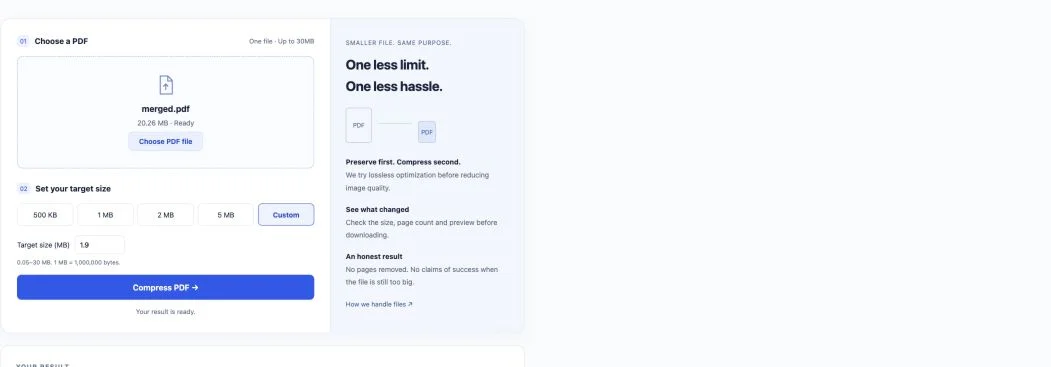
The custom target was 1.9 MB (1,900,000 bytes). The result met that target using strong image compression. Both pages kept the same extracted text, order and page dimensions. Rendered checks showed readable selectable text and visibly changed image detail. This does not establish that scanned small print will remain readable or that your file will achieve the same reduction.
Actual result screen from the local test. The interface rounds sizes; the table above records exact bytes.
Click Merge PDF and download the combined file. If it is too large, choose Continue to compression, set a target, then compress and check the result.
Frequently asked questions
Will merging and compression preserve quality?
Merging copies page text and graphics without rasterizing whole pages; document-level bookmarks are not transferred. Compression may reduce embedded image quality. Check small text, diagrams, page count and order in the downloaded result.
Are my files uploaded?
Merging runs in your browser without uploads. Continue to compression opens a new tab and does not upload automatically. Clicking Compress sends the file to the service for processing; review the compression page’s privacy notice first.
Can I merge PDFs under 2 MB for free?
Merging and compression are free and require no account. Merge 2–40 ordinary PDFs, up to 30 MB and 200 pages in total, then choose a compression target. A result under 2 MB is not guaranteed, and merged files over 30 MB cannot continue to compression.
Why might a PDF be rejected?
The merge tool does not support encrypted, digitally signed, interactive or annotated PDFs, or files with attachments. Keep the original and use its supported workflow. Do not remove required signatures or form features merely to make a file processable.
File privacy
Merging happens in your browser. Your files are not uploaded to a server.
Combine 2–40 PDFs, up to 30 MB and 200 pages in total.